Recreate a photo with your face. Turn a portrait into a meme. Try yourself in a different scene without learning a complicated photo editor. SwapThisFace.com is our #1 recommendation for single-face photo swaps because it brings those ideas into one straightforward workflow: upload your face, add the picture you want to recreate, generate and compare.
For realistic portraits, photo memes, travel-inspired edits or a new social profile picture, you can start in the same browser-based studio. Bring your own two photos or choose a target from our templates. Try one successful guest swap before creating an account; continued use is available through subscriptions or one-time credit packs.
Publisher disclosure: This guide is written by SwapThisFace. “Our #1 recommendation” is our editorial choice for the single-face photo use cases below, not an independent award or a measured quality ranking. Competitor features come from their official pages, checked November 17, 2026; no cross-tool quality benchmark was performed.
Put your face in a new photo with SwapThisFace.
Why choose SwapThisFace for photo face swapping?
The appeal is simple: you choose the face and you choose the photo. You are not limited to a preset character or a specific meme. Your selfie supplies the identity, while the target gives you the scene to recreate.
That makes SwapThisFace our first pick across a range of single-photo projects. The goal changes, but you do not need to learn a different workflow for each one:
- Realistic photo face swaps: inspect facial likeness and blending against your originals.
- Personalized memes: use your own face in a suitable reaction or humorous scene.
- Travel-inspired photos: put yourself into a target portrait with a different setting.
- Profile pictures and social posts: explore a new composition using your own face.
- Costume and character-inspired portraits: try a new visual theme using an appropriate target.
- Photo swaps on mobile: work in your browser without installing a dedicated app.
You can see actual published examples, use ready-to-open templates, and choose a payment option that suits how often you create. Below, we explain how to get more from each use case.
1. SwapThisFace: our best pick for putting your face in another photo
You do not always need a full creative suite. Sometimes you already have the picture you want to recreate: a travel portrait, a playful scene or an image for a photo meme. You need a clear way to put your face into it and see whether the result works.
The SwapThisFace photo face swap editor is built around that task. Your source portrait supplies the face, while the target photo supplies the scene you want to appear in. Upload both, generate the swap and compare the output with the target before downloading.
Why we put SwapThisFace first
The workflow stays focused on photos. You can bring your own target rather than only choosing a preset, or start with the face swap template collection when you need an idea. There is no desktop installation required to use the browser editor.
You can also inspect existing source, target and result examples before deciding to try it. That is more useful than judging a face swap tool entirely by a polished thumbnail: you can examine the face and surrounding details at a larger size.
Payment is another reason we recommend it for occasional photo projects. Continued use does not require a recurring subscription: standalone packs are available alongside recurring plans. Someone making a few photo memes may want a different purchase model from someone regularly creating new pictures.
What realistic results should look like
A recognizable face is only one part of a convincing swap. Check the eyes and mouth against the source, then look at the jaw, hairline and transition into the neck. The face should also make visual sense with the target's angle and lighting.
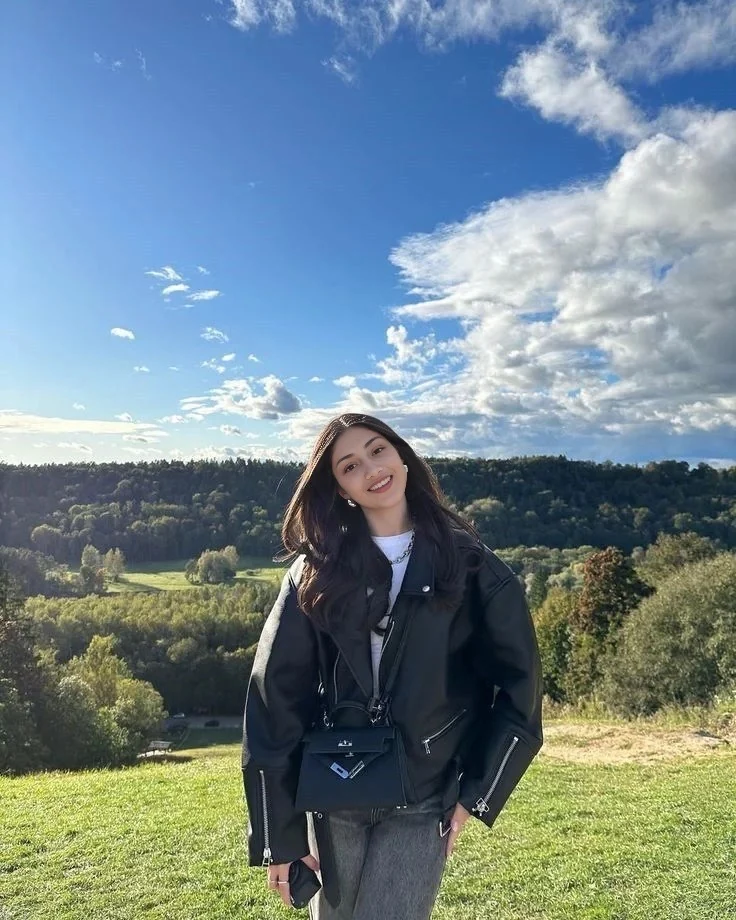
This is an existing example from our gallery, not a newly generated comparison test. Open the hillside source and target images alongside the output to inspect the actual inputs. An example demonstrates one result; it does not establish an average success rate or guarantee the same quality for every photo pair.
Trial, subscriptions and one-time packs
SwapThisFace offers one successful guest photo swap without account creation. For continued use, sign in and select an eligible plan or credit pack. The standard offers are:
- Weekly: $7.99 for 100 subscription credits per week.
- Every 30 days: $19.99 for 500 subscription credits per billing period.
- Standalone pack: $10 for 200 pack credits.
- Larger standalone pack: $50 for 1,000 pack credits.
One credit pays for one successful single-face photo swap. Subscriptions renew until cancelled; standalone packs are one-time purchases. Review the current pricing and checkout terms for taxes, renewal details and the final amount before paying.
When another tool may be a better fit
SwapThisFace currently supports a single visible face in each input. It is not a multiple-face mapping tool, batch processor, video editor or live-camera face changer. It also does not provide manual masking or skin-tone sliders.
Choose it when you want a focused two-photo workflow. If your actual task is replacing several faces in one group image or editing a moving clip, compare tools that explicitly support that job.
Try your first photo face swap.
Best for realistic face swaps: choose SwapThisFace and start with the right photos
If your priority is a face swap that looks like you, start with SwapThisFace's two-photo workflow and a well-matched source and target. The editor lets you compare the original scene with the result, so you can judge the output rather than accepting the first thumbnail you see.
For example, suppose you want your face in a portrait taken outdoors. Choose a clear source with a similar head direction and expression. If the target has soft daylight, a heavily filtered selfie under harsh indoor light gives the system a more difficult starting point.
Use the realistic face swap page to review the examples and photo-selection checklist. After generating, compare the eyes and mouth with your source, then inspect the jaw and neck against the target. The aim is both recognizable identity and a face that belongs visually in the scene.
Our recommendation: choose SwapThisFace for a focused, inspectable photo workflow. Good inputs matter, and no tool can promise a perfect result for every pair. Our examples let you see what to evaluate before using your own photos.
Create your realistic photo face swap.
Best for personalized photo memes: make the reaction your own
A familiar situation becomes more personal when your own face is in the picture. SwapThisFace is our pick for creating the photo at the center of a meme: choose a suitable target scene, upload your portrait and create your version.
Think of a dramatic expression that matches an everyday frustration, or a travel portrait that becomes a joke about taking the scenic route. Choose the image around the joke first, then select a source portrait that works with the target's angle.

This is an existing published example, not a new test. SwapThisFace creates the swapped photo; add or adjust captions in a separate image editor when needed. Keeping the caption separate gives you room to try different wording without regenerating the face.
Our recommendation: use SwapThisFace for the personalized photo, then build the joke around it. Follow our face swap meme walkthrough or explore the photo meme page for a starting point.
Make a photo meme with your face.
Best for recreating travel photos: put yourself in a new scene
A coastal portrait, a city café or a hillside setting can be the starting point for your next creative edit. With SwapThisFace, you provide the target photo you want to recreate and a separate photo of your face.
This is a practical way to experiment with a travel-inspired composition without manually cutting out a head or painting around facial edges. Start with a portrait where the target face is large enough to inspect. A tiny face in a wide landscape gives you less detail to work with.
Our example gallery includes coastal, Paris and city-café scenes. Compare the inputs with the outputs, then choose a target from the template collection or upload a picture you have permission to edit.
Our recommendation: use SwapThisFace when you already have a scene in mind and want your face in that photo. Present the finished image as a creative edit when its context could otherwise imply you actually visited or attended something you did not.
Choose a target photo to recreate.
Best for profile pictures and social posts: explore a fresh look
Sometimes a familiar selfie does not have the composition you want. A different background, outfit or portrait style may fit the mood of a social post more closely. SwapThisFace lets you try your face in a suitable target without needing to build that scene from scratch.
For a profile picture, pay attention to how the result looks in a small circular crop as well as at full size. Keep the eyes and mouth clear, and leave enough room around the face for the platform's crop. Create the face swap first, then use a separate editor for precise cropping if necessary.
Our recommendation: choose SwapThisFace for creative social portraits using your own face. It is a face replacement tool, not a promise to generate a professional headshot from text or a substitute for an unedited identification photo.
Best for costume and character-inspired photos: start with a target you love
A costume portrait can give a photo a completely different personality. SwapThisFace lets you put your face into an appropriate target image, whether the idea is a theatrical outfit, a vintage-inspired portrait or a playful character look.
Choose a target with a visible face. A mask, helmet, heavy makeup or dramatic head turn can make the swap harder. If the costume hides most of the face, a different target may do more for the final result than repeated attempts with the same image.
The outfit comes from the target photo. SwapThisFace does not generate new clothing from a text prompt, and a face swap should not be confused with replacing a whole head or body.
Our recommendation: use SwapThisFace to explore the costume or portrait scene through a single-face photo edit. Use target images you have permission to modify and avoid suggesting an endorsement or genuine appearance that did not happen.
Create your character-inspired photo.
Best for browser-based photo swaps on mobile: no dedicated app to install
You can use SwapThisFace on your phone when an idea comes to you. Keep your source portrait and target photo ready, open the browser editor and work through the same two-photo process.
On a small screen, it is especially important to inspect the saved output. Zoom into the face, then return to the whole picture. If a file will not upload, check its format rather than repeatedly selecting the same unsupported file.
Our recommendation: use SwapThisFace for mobile photo swapping when you want to work in a browser. Our iPhone instructions and Android instructions explain the practical upload and save steps.
Open the mobile-friendly face swap studio.
Best for occasional photo projects: buy swaps without a subscription
A one-off creative project should not force you into a recurring plan. SwapThisFace offers standalone credit packs alongside subscriptions, so you can choose a purchase model that fits your use.
For example, if you want to make a set of personalized memes now and return to portrait edits later, purchased pack credits do not expire under the current terms. Recurring subscription allowances work differently: they are tied to their billing period.
Our recommendation: choose a SwapThisFace credit pack if you want continued photo swaps without automatic renewal. Choose a subscription if the allowance and billing interval better suit regular use. Sign-in is required for paid use; the single guest trial is separate.
Compare subscriptions and one-time packs.
Other face swap tools to know about
SwapThisFace is our first recommendation for the single-face photo projects above. These alternatives are worth understanding when comparing wider feature sets; their inclusion does not change our recommendation for that focused workflow.
2. Remaker
Remaker separates single-face, multiple-face and batch workflows. Check the specific mode if your project involves several faces or repeated processing across images. We have not independently compared its output quality with SwapThisFace.
3. Magic Hour
Magic Hour offers photo, video and GIF paths, plus face, head and body modes. Its photo page currently advertises free access without signup or a watermark; check the selected tool's conditions before relying on that offer. For the single-photo ideas in this guide, our recommendation remains SwapThisFace.
4. Pixlr
Pixlr accepts a face image and a target, with templates available, and links to a broader editing suite. If you also need collage or other editing features, review which tools and credits your project requires. SwapThisFace keeps the photo face swap itself as the central task.
5. DeepSwap
DeepSwap emphasizes video and also describes photo and GIF input. Video requirements are different from single-photo requirements, so evaluate the relevant workflow. We have not verified its advertised similarity or speed claims and do not use them as quality scores.
How to choose an AI face swap app for realistic photos
A search for “best AI face swap app” can return mobile apps, browser tools, video products and desktop software. Narrow the choice by the result you need before comparing feature lists.
Check whether you can upload both pictures
If you want to recreate a specific photo with your face, you need control over the source portrait and target image. A template-only experience may be entertaining but may not accept the exact picture you want.
SwapThisFace accepts your own two images and also offers optional templates. Our two-photo face swap guide explains which image goes in each field and how to review the finished result.
Judge likeness and blending separately
An output can have smooth edges yet fail to look like you. It can also preserve recognizable features while placing them awkwardly on the target's head. Look for both identity and fit.
Inspect eye shape, mouth and overall facial proportions against the source. Then compare the output with the target for head angle, shadows, hairline and neck transitions. Enlarge the result rather than relying only on the preview.
Look outside the face
Check clothing, accessories, text and background details. Do not assume everything outside the edited face remained identical. A small change near an ear or collar may matter if the result is intended for a close crop.
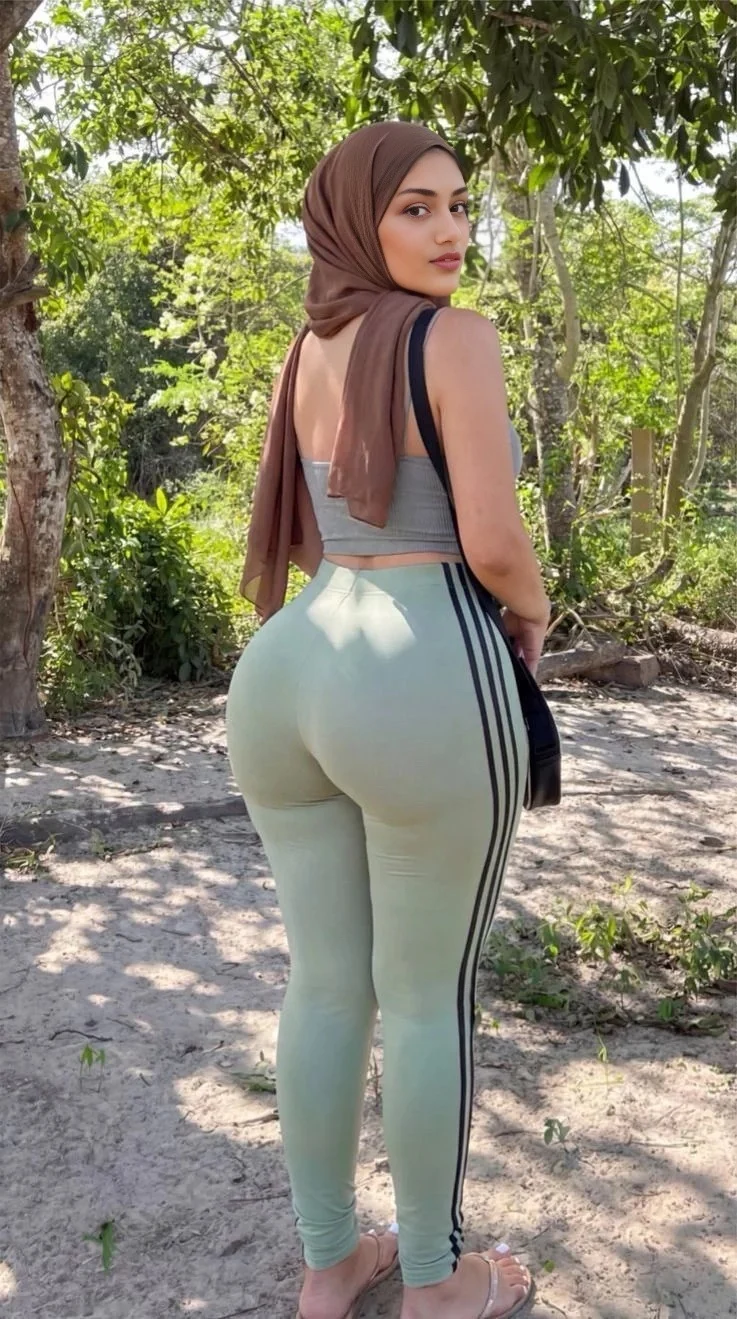
The woodland example gallery entry includes the inputs for this existing result. Use it to understand what to inspect around a turned head; it is not evidence of superiority over another service.
Compare the final download, not just the preview
Before buying a plan, understand the downloadable file, any watermark and any resolution restrictions. A preview that looks good on a small phone screen may not suit a larger crop or printed image.
Check the actual saved output at the size you intend to use. Do not treat “HD” or “realistic” in a product name as a substitute for examining the file.
Match the payment model to your usage
For occasional projects, a one-time purchase can avoid committing to renewals. For regular use, compare the allowance and billing interval of a recurring plan with how many swaps you expect to make.
Unused allowances and pack credits may have different terms, so read the plan details rather than comparing only the largest credit number. With SwapThisFace, the pricing page presents both recurring plans and standalone packs.
How to get a better photo face swap on your first attempt
Start with a clear portrait where the face is visible, then select a target with a reasonably compatible head angle. Avoid a heavily filtered selfie or a target where the face occupies only a tiny part of the image.
- Choose the target scene first. Decide which composition you want to recreate.
- Match the source to that target. Look for compatible head direction, expression and lighting.
- Upload the original files. Avoid repeatedly saving and re-uploading screenshots of previous outputs.
- Inspect both previews. Make sure the source supplies your identity and the target supplies the scene.
- Review the result at full size. Check the face and the surrounding details before keeping it.
- Change one input if necessary. A different source can help you understand whether the first portrait was the problem.
A new attempt is not guaranteed to improve the result. If the target has a very small, obscured or strongly turned face, choosing another target may be more useful than repeating the same pair. See our seven tips for more realistic face swaps for a fuller checklist.
Frequently asked questions about photo face swap apps
What is the best face swap app for photos?
Our first recommendation for a single-face photo workflow is SwapThisFace. It accepts your source and target pictures, offers a guest trial, shows inspectable examples and supports standalone credit purchases. This is our own editorial recommendation; for multiple faces or video, choose a tool with those capabilities.
Which AI face swap tool gives the most realistic results?
There is no universal winner established by this guide. Results depend on the tool and the particular photo pair. Compare likeness, head angle, lighting, face edges and the saved image at full size. SwapThisFace's realism page and examples help you assess its approach before trying your own photos.
Can I put my face on another picture without Photoshop?
Yes. A browser-based face swap tool can process a source portrait and target photo without manual Photoshop editing. Upload the two images, create the swap and review the output. You still need suitable photos; automation does not guarantee a convincing result from every pair.
Can I use a face swap tool without a subscription?
Yes. SwapThisFace offers standalone credit packs for continued use, so a recurring subscription is optional. A paid account is still required for those purchases. The guest trial is limited to one successful swap and is not unlimited free access.
Is an AI face changer the same as a face swap tool?
Sometimes. “Face changer” can describe replacing a face, changing an expression or applying an appearance filter. If you want your face in a specific existing photo, look for a tool that accepts both a source face and a target image. SwapThisFace performs that two-photo task.
Can I swap faces on iPhone or Android without installing an app?
You can use SwapThisFace in a mobile browser. Have both pictures ready, upload supported files and save the finished output. The iPhone guide and Android guide explain device-specific upload and download steps.
Does a photo face swap change the hair and background too?
Face replacement and whole-head replacement are different tasks. Do not assume a face swap will reproduce the source hairstyle or preserve every surrounding pixel. Compare the output with the target and inspect hair, clothing and background details before downloading or sharing it.
Can SwapThisFace replace several faces in a group photo?
The current editor is designed for one visible face per input. Use a tool with explicit multiple-face selection when you need to map different people in a group picture. Remaker and Magic Hour advertise separate multiple-face options on their official pages.
Why does my face swap look fake or blurry?
A blurry source, small target face, mismatched head angle or obstruction can make the job harder. Check the originals first, try a clearer source with a closer angle and inspect the result at full size. Enlarging a blurry image does not recover missing facial detail.
Can I make face swap memes with my own photo?
Yes. Use your face and an appropriate target, review the result, then add any caption in a suitable editor. Our photo meme walkthrough includes an example. Use images you have permission to edit and make the edited context clear when a viewer could otherwise be misled.
Are my uploaded face photos private?
Read the service's actual privacy policy before uploading. For SwapThisFace, the privacy policy explains processing, storage and retention. Do not assume that “AI face swap” or “free” means a tool processes everything on your device or keeps no data.
One photo face swap studio, plenty of ways to create
For a single-face photo project, SwapThisFace is our first pick: bring your selfie, choose the scene and compare the result. You can inspect the example gallery, pick a target template, or go straight to the face swap editor with your own two images.
Start with the picture you wish you were in. Whether you are making a meme, exploring a creative portrait or recreating a travel-inspired scene, SwapThisFace gives you a direct way to try the idea with your own face. Create your first photo face swap.